BFH swisscovery
The collections (books and E-books, print periodicals and online periodicals, DVDs etc.) of the BFH University Library and its subject libraries can be found using this search platform swisscovery.bfh.ch.




The media offerings of the BFH Library include books, e-books, print periodicals, online periodicals, subject databases, musical scores and much more.
The collections (books and E-books, print periodicals and online periodicals, DVDs etc.) of the BFH University Library and its subject libraries can be found using this search platform swisscovery.bfh.ch.
In our short course you will learn ...
Information about swisscovery can be found at swisscovery.help
If you have any questions, please contact us!
Contact us if you would like to have a short course on a different date or in English.
You can participate in the training, which takes place virtually via MS Teams, using the link above. Only your dial-in and registration data will be transmitted via MS Teams. Sound and image data will only be processed if you allow this in your settings (microphone, camera). The Bern University of Applied Sciences does not store any personal data that can be seen from the event; in particular, no recording is made. In addition, the BFH has chosen MS Teams, a program for which compliance with the standards required by data protection law is assured. The responsibility for the operation of the software lies with the provider. Details on the processing of personal data can be found in the provider's data protection information. By participating, you consent to the processing of your personal data.
Physical media are for the most part housed in the open stacks for access and can be borrowed. In order to borrow library media you much register for a swisscovery account (Registration).
Applicable loan periods are directly visible in swisscovery.
Most subject libraries offer self-check-out borrowing.
The SLSP Courier service (“Further request options” in swisscovery) allows you to request media from another library. The fees can be found in the fee table.
Please note: not all swisscovery libraries participate in the SLSP courier service.
Ordered media can be picked up during service desk opening hours in the particular library location you selected as Pick-up location. You will receive an e-mail as soon as the medium is available for pick-up.
Licensed databases and other online resources are accessible to BFH students and staff when connected via the BFH Wi-fi network "bfh" and/or VPN.
With OpenVPN Connect, you can access services from home or whilst on the move that are normally only available on the BFH network (remote access). To access the BFH Library’s online resources, select the "all.vpn.bfh.science" profile in OpenVPN Connect (instructions for setting up the profile).
You log in to OpenVPN Connect using your BFH username and password, and this must be confirmed via multi-factor authentication (MFA). OpenVPN Connect must be installed on personal devices beforehand.
The online resources are available to other library visitors at the research stations in the libraries.
Freely available media in the sense of Open Access are marked as such in swisscovery search results.
The use of the libraries on site and the borrowing of media are free of charge.
The intervals for return reminders apply to the loan periods of 28 and 14 days respectively. For shorter loan periods, the reminder intervals are also shorter.
|
Notification or recall |
no charge, sent after 1 day after the item due date |
|
1st reminder |
CHF 5 per item, charged on 7th opening day after initial recall |
|
2nd reminder |
additional CHF 5 per item, charged on 7th opening day after 1st reminder |
|
3rd reminder |
additional CHF 10 per item, charged on 7th opening day after 2nd reminder |
|
Compensation for loss |
cost of replacement plus CHF 30 administration fee; charged on 7th opening day after 3rd reminder |
|
Compensation for damage |
repair costs as incurred |
|
Debt recovery and enforcement fees |
as necessary |
|
Postage |
CHF 12 per item |
|
SLSP Courier |
CHF 8 per item |
|
Copies (if available) |
PDF per email (Switzerland): CHF 5 per 20 pages |
[July 2024]
Fees can be paid via TWINT at the library counter of the Sub libraries (with the exception of the Swiss Literature Institute Library). At the HKB libraries – the Media Library, the Music Library and the Swiss Literature Institute Library – as well as at the TI Library in Biel/Bienne, it is also possible to pay by card. If you have already received an invoice, payment can no longer be made at the branch library.
Fees for payable services as well as any applicable overdue fines incurred while using swisscovery shall be billed to you by SLSP. The monthly bills contain the charges for the month before last. For example, in May you will receive the invoice with the fees from March. If you are unsure, please consult the SLSP Website.
When logged into swisscovery, you can consult the fees linked to your account directly under: My account > Fees
The following terms of use apply to the following libraries of the BFH Library:
The EHSM Sport media Library HSM, Magglingen has its own terms of use.
All these libraries are part of the Swiss Library Service Platform (SLSP) and accessible with search platform swisscovery, which is operated by SLSP.
The BFH Library provides information and literature for BFH students and employees. These are also available to other interested parties. Use of BFH libraries is free, although there are charges for specific services (see Fee table).
By registering, the user accepts the present terms of use.
Registration (free of charge) on the swisscovery research platform is required for borrowing media and using other services. Therefore, a SWITCH edu-ID account is necessary and may be created during the registration process if it does not already exist.
The users are responsible for ensuring that the personal details they provide are correct and up-to-date (see SLSP Privacy Policies). They must update their personal details (such as address) themselves in their SWITCH edu-ID account.
Employees of the BFH Library cannot make any changes to personal data.
The user can set the preferred address (home or work) in the swisscovery account and add or remove library cards: swisscovery – Library Card Management and Settings.
The library card is required for on-site borrowing. It is personal and therefor non-transferable. The library card may be purchased at any swisscovery library. BFH students and employees can use their BFHcard as a library card. Library cards issued by other swisscovery libraries are also recognised.
Library items are generally available for borrowing. However, certain designated items can only be used on site. Special loan conditions may apply to individual media or media groups. A maximum of 100 items can be borrowed per user.
The standard loan period is 28 days for most media. Unless the borrowed item is requested elsewhere, it is automatically extended for a further loan period of 28 days (up to five times). The deadline is displayed in the swisscovery user account.
When the maximum loan period expires, the item must be returned. If the item has not been reserved, you can borrow it again from the lending desk.
Items should be returned prior to absences longer than the loan periods of the borrowed items (military service, holidays, study abroad etc.).
Media can be ordered for collection at a charge from all BFH libraries participating in the SLSP Courier service. The terms of use of the supplying library apply. The University library pays the courier fees for BFH members, provided that the pick-up location is a BFH library. Requested media must picked-up within 6 library working days. Courier media that are not picket-up will be returned. The delivery fees must also be paid in the event of non-collection (see Physical Resources services section on help page about swisscovery).
For a fee, BFH libraries can send out items from their own inventories (see Fee table).
Media should be handled with care, protected from damage and returned in an undamaged and complete condition. Notes and marks shall also be deemed to be damage. Any cost of repairs or replacement shall be assumed by the responsible party.
The user is fully liable for any damage or loss of borrowed documents. Existing damage or missing inserts (data carriers, cards, parts etc.) must be reported immediately, or at the latest upon the return of the material.
For damaged or lost media, the University library charges repair or replacement costs as well as handling fees (see Fee table).
The user is responsible for adhering to loan periods. Reminders that are not received are not accepted as grounds for late returns. No correspondence will be entered into in this regard.
After the loan period has expired, an "Overdue items - Reminder" (free of charge) is sent from <noreply@slsp.ch>. Subsequent reminders are subject to a fee.
The third reminder also results in the blocking of the swisscovery user account. If the item is not returned it is entered as lost. The replacement costs and administrative fee are charged to the responsible party (see Fee table).
Overdue fees can be paid at the lending desk with TWINT if an invoice has not yet been issued.
Use of library media is governed by the Swiss copyright guidelines and is intended exclusively for personal use. Transfer to third parties and commercial use are prohibited.
Chamber music scores and scores for solo instrument with (piano) accompaniment may be given to third parties under the following conditions: The borrowing person is responsible for ensuring that all parts and possible supplements are returned on time, complete and in perfect condition (without annotations). If the music sheet or parts of it are returned too late or with annotations, the borrowing person is liable and will be charged the corresponding fees. Commercial use is also excluded.
Users are responsible for informing themselves about any copyright issues. The BFH declines all liability in the case of copyright infringement.
For information about Conditions for access and use of online resources, see FAQ online resources.
Public workstations in the BFH libraries are primarily provided for information on online offerings and research for scientific, specialist, professional or educational purposes.
All users are required to observe legal provisions with regard to Internet use. With respect to liability, misuse and the consequences of misuse, we refer users to the Guidelines on the use of IT resources at BFH.
The conduct of users within the library areas must not impinge upon the rights of other persons, impact library operations or cause damage to equipment, facilities etc.
Users are obliged to comply with the instructions of library staff. Failure to do so can result in the user being asked to leave. Repeated or severe infringements of the terms of use can result in exclusion from library use.
[January 2022; updated Oktober 2022: cash payment of overdue fees no longer possible; July 2026: broken links corrected]
In addition to swisscovery, the Library offers a wide range of subject databases and other online resources.
To help you find your way around quickly, we have compiled a list of the most important databases for each subject area.
Licensed databases and other online resources are accessible to BFH students and staff when connected via the BFH Wi-fi network "bfh" and/or VPN. Some online resource providers also offer access via Shibboleth or Switch edu-ID. A few online resources do require an additional password (BFH-internal). Most online resources can be accessed by other library visitors using research stations in the sub-libraries.
To support you in searching for scientific literature, we offer training courses and self-teaching materials.
If you need individual assistance, please send us an e-mail.
The browser extension Lean Library leads you directly to electronic full-text content offered by your BFH library.
For best results, always activate the VPN.
Lean Library enables you to initiate a search on the swisscovery search platform from any website:
The Moodle course BFH Literature Search gives BFH students an introduction to researching scientific literature.
You can decide based on various criteria whether or not you should use a resource when preparing your research paper. The following checklist provides a basis for decision making:

Depending on the type of publication, you can choose the appropriate search tool:
Always look for the “search@BFH” button. It often leads directly to the text you are searching for.

Install LeanLibrary, a browser extension, to support your research.
Activate your BFH VPN, even when using Google or Google scholar, for ex., as this can in some cases lead directly to the full-text.
Journal articles can be found primarily in subject databases. Many databases contain only bibliographic references (index information about literature) and abstracts, but not the complete text of an article (full-text).
Look within the bibliographic reference entries for download links with labels such as "Full Text", "PDF", "Read", etc. Sometimes the DOI (digital object identifier), the Lean Library box or the “search@bfh.ch” directs to the full-text.
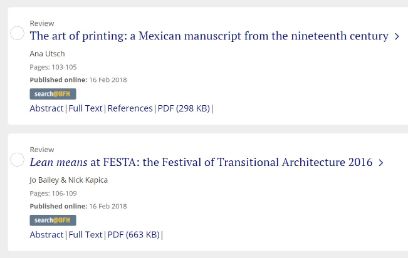
If none of these routes direct you to the full-text, try using the swisscovery search platform.
Search in swisscovery using the title of the journal instead of the title of the article. Use the "Advanced Search", go to the heading "Resource Type", select "Journals" and stay in the "BFH" search profile.
If the electronic version of the journal is available, you will be directed to the journal full-text by clicking on the “View Online” link and you can then find and download the article PDF. In some cases, you may need to enter an additional password (BFH internal).
If the journal is only available in print, you can copy or scan the article at the library where it is located.
If the BFH Library does not have the journal you need in its collections, broaden your search to include all of swisscovery. You can then visit the library that holds the journal and download the article you want there. Please note: You do not have remote access to online resources held by libraries at universities other than the BFH.
Some swisscovery member libraries allow you to order copies or scans for a fee. Alternatively, use the service Orders for Copies at the University of Bern Library.
The many AI tools have a variety of different functions and therefore offer various possible ways of supporting an efficient search for literature.
In our Moodle course, you will find background information and assistance on literature research with AI.
In addition, we regularly offer online-training courses on Searching with AI. You can learn in 90 minutes how to employ AI in the framework of literature research. The training class is online via MSTeams. Registration is done via Moodle. Before the training course, you will receive instructions by email, along with the MS Teams link to join the session.
Tuesday, 10 November 2026, 9am–10.30am (German)
Tuesday, 8 December 2026, 2.30pm–4pm (German)
Thursday, 28 January 2027, 8.30am–10am (German)

Zotero is a free reference management programme for collecting, managing and citing a wide variety of sources. With Zotero, you can
In our Moodle course (BFH-internal) you can find instructions (videos, etc.) and tips for working with Zotero.
We regularly offer online courses about Zotero.
Discover in 90 minutes how to make optimum use of Zotero.
The training course is provided online via MS Teams.
Registration is via Moodle. One week before the course date you will receive the MS Teams link for participation and information about how to install the program at your BFH e-mail address.
Monday, 24 August 2026, 4.30pm–6pm (German)
Writing is not a question of talent. Writing is a question of practice. Especially when it comes to writing scientific texts.
In the Moodle course "Schreiben – écrire – writing" you can find instruction in the art of academic writing and helpful suggestions for getting started with the writing process.
Electronic media and other online resources offered by the BFH Library are accessible to BFH students and staff on the BFH network, within Wi-fi «bfh» and/or with VPN. Most online resources are available to other library visitors at the research stations in the sub-libraries.
With OpenVPN Connect, you can access services from home or whilst on the move that are normally only available on the BFH network (remote access). To access the BFH Library’s online resources, select the "all.vpn.bfh.science" profile in OpenVPN Connect (instructions for setting up the profile).
You log in to OpenVPN Connect using your BFH username and password, and this must be confirmed via multi-factor authentication (MFA). OpenVPN Connect must be installed on personal devices beforehand.
On some BFH campuses you will need to activate VPN, even when using “bfh” Wi-Fi, in order to access online resources (e-books, online periodicals, research databases, etc.).
Outside of the BFH campus, that is to say the BFH-network area, students and employees of the Bern University for Applied Sciences can access online resources by setting up a VPN. Some online resource providers also offer access via Shibboleth or SWITCH eduID.
In case of difficulties using remote access via VPN, please follow this checklist:
All employees and students of the Bern University of Applied Sciences (BFH) have automatic free access to BFH online resources such as E-books, E-journals, databases, etc. via the BFH Network (sometimes requires additional activation of BFH VPN). We make an effort to avoid licensing products that require you to create a personal account to gain access.
All BFH students and employees can also install the BFH VPN for use when accessing online resources from off campus. You need to use your BFH-login for this purpose. The VPN allows you to conduct searches within the anonymous environment of the institutional network.
We recommend that you only register a personal account on the website of a publisher or database provider if it is absolutely necessary – for example to activate functions such as alerts or the ability to save searches. If you register an account, for example on a publisher website, you are making a direct agreement with them. Inform yourself about what will happen with your personal data. Fill in only the required fields in online forms.
Please pay attention to and obey all Conditions for Use stipulated by publishers/providers of online resources. These general principles apply:
Violations of Conditions for Use can lead to the denial of access to full-text publications by the publisher/provider in the future.
The publishers/providers of online resources may use usage data containing information about the identity of users for the purpose of operating and improving the service.
If the online resource (E-journal, database, etc.) requires you to enter a password, consult the password list provided by your library.
Passwords should never be given to third parties. Consult the IT Information page.